Automation Scripts extend Maximo functionality without Java compilation or downtime.
Supported languages: Jython, JavaScript, Python—all executing server-side.
Key advantages:
✓ Zero-downtime deployment: Enable/disable at runtime✓ Upgrade compatibility: Stored as database metadata✓ Consistent performance: Server-side execution✓ Flexible event handling: Single scripts trigger multiple events
Real-world impact: 30-40% reduction in time spent on manual data entry.
─────────────────────
PRACTICAL AUTOMATION PATTERNS
Auto-Calculated Fields: Safely calculate task duration based on labor hours and complexity,with error handling.
Smart Validation: Enforce business rules—high-priority work orders require supervisorapproval.
Compliance Automation: Validate all required safety fields before work order creation.
These patterns enforce organizational standards at the platform level, eliminating manualverification.
─────────────────────
AI-POWERED OPERATIONS
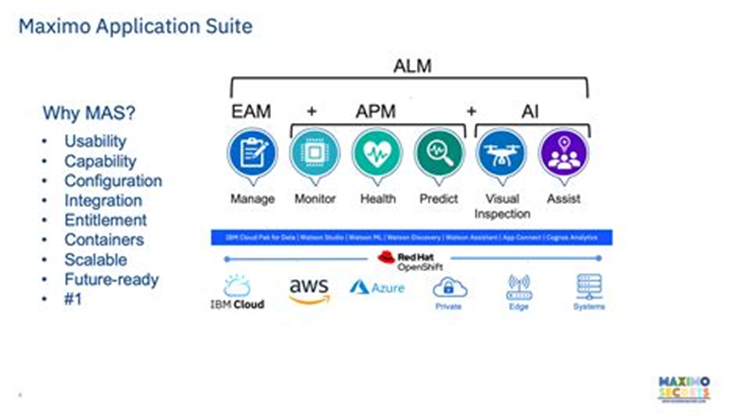
MAS 9.1 introduces Maximo Assistant powered by watsonx.ai—enabling natural language queries:
"Which work orders are missing job plans?""Show me assets with declining performance""What's the total maintenance cost per site this quarter?"
Users report 91% accuracy in problem code suggestions and dramatic analysis time reductions.

─────────────────────
COMBINING AUTOMATION AND AI
Scripts handle deterministic validation and compliance. AI brings adaptability andpredictive insight. Combined: intelligent workflows that adapt while maintaining governance.
Condition-based Maintenance: Real-time monitoring triggers work orders instantlyFailure Prediction: AI forecasts equipment failures weeks in advanceIntelligent Scheduling: Automation optimizes maintenance based on AI insights
Organizations implementing this approach report:
→ 25-35% reduction in unplanned downtime→ 40-50% improvement in maintenance resource utilization→ 60% faster issue resolution
─────────────────────
IMPLEMENTATION STRATEGY
- Identify high-friction manual processes
- Design automation scripts addressing these
- Deploy in phases with testing
- Gradually introduce AI-powered predictive features
- Measure and iterate
Start with targeted automation addressing pain points. Gradually introduce AI. Whethervalidating data, enforcing compliance, or implementing predictive maintenance—the toolsexist today.
.png)